

Maps
A tag group can be a place. Turn that on and its tags stop being a list of names and become zones you draw: outlines on a canvas, with hands pinned to positions inside them. Drag a hand from one zone to another and it’s rebound to the new zone’s tag.
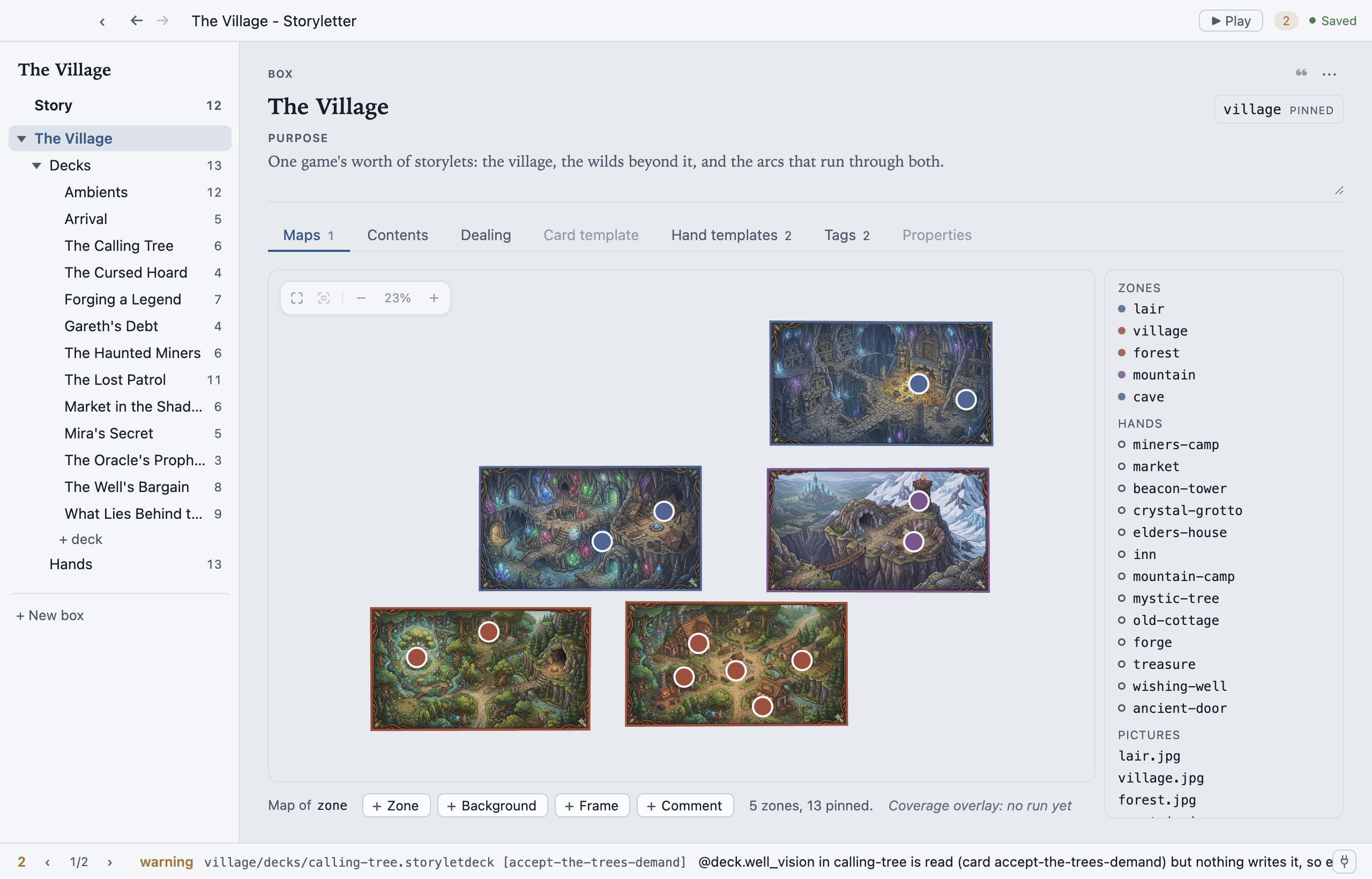
One thing to hold on to: a map is a drawing of tags you already have. There’s no geometry in the engine, and nothing in a bundle that a runtime reads as a shape. A zone is a tag; a site is where you chose to draw a hand. Delete the whole map and the project plays identically.
Turning a group into a place
Section titled “Turning a group into a place”Open the box, go to the Tags tab, pick a group, and turn on A place under Map. The group’s tags are now zones, and the box grows a Maps tab.
A box can have several spatial groups, and each is its own map. A box with none has no Maps tab at all.
What you can put on it
Section titled “What you can put on it”The strip under the canvas carries the four things you can add:
- Zone: trace an outline for one of the group’s tags. A tag with no outline yet is offered when you start drawing; you can also draw a shape first and make the tag with it. Drag a corner to reshape, drag a mid-point to add one.
- Background: a picture behind everything, to trace over. Move it, scale it, fade it, lock it so clicks pass through, or hide it.
- Frame: a labelled rectangle that describes the map to whoever reads it. It means nothing to the engine.
- Comment: drop a thread straight onto the canvas as a marker. See Reviewing.
Hands are placed from the map’s own side panel: a hand with no position yet is offered there.
Sites and overlapping zones
Section titled “Sites and overlapping zones”A site is a hand’s position on this map. Drag it into a zone and the hand is rebound
to that zone’s tag. That’s a real edit to hands.storylethands, and one undo step.
Zones can overlap. A market square inside a district is a perfectly normal thing to draw, so “which zone is this site in?” needs an answer, and the rule is: a site belongs to the frontmost zone containing it, and to no other. Frontmost means the one drawn on top, which is the one you can see at that point.
Drawing one outline inside another does not make it a sub-zone. Zones are tags, and
tags don’t nest, so a site sitting inside both village and the-inn belongs to
whichever is in front, and only that one. Filter to the other and you won’t find it.
You can’t see that on a drawing, so the editor shows it: a site sitting inside more than one outline wears a dashed amber ring, and selecting it explains which zones don’t count. It’s a warning, not an error: nothing is broken, and you may well have meant it.
If you want containment to mean something, use two tag groups, say a region group and a
place group, and bind a hand in both.
Reading the map
Section titled “Reading the map”- Zoom and fit live in the bottom-right control: fit everything, fit the selection,
zoom out, back to 100%, zoom in.
Homefits,Ffits the selection. The full key list is on Keyboard shortcuts. - A site is coloured by its zone, so a site whose colour disagrees with the ground under it has been moved off the zone it’s bound to.
- A hollow site is a hand nothing is binding: it marks a spot and no more.
- View ▸ Coverage Overlay, once you’ve run a coverage test, tints sites by how much play reached them. See Coverage testing.
Where the map is stored
Section titled “Where the map is stored”Positions live in view.storyletview, the arrangement shard, and nothing else does. Which
zone a site is in is not recorded there: that’s the hand’s binding, in
hands.storylethands. So two people rearranging one map produce a position conflict, not
a content one. See The shards.
MIT-licensed open source · Made by Ian Thomas · storylet.studio