

Coverage testing
Playing your project walks one route. Coverage testing walks hundreds: it plays the project many times with seeded random runs and reports what actually came up, so you catch content a player can never reach before a player does.
It’s the same machinery in the editor and on the command line, so what you see in Storyletter is what a CI gate sees.
In Storyletter
Section titled “In Storyletter”Review ▸ Coverage (Shift+Cmd+C) opens the Coverage window.
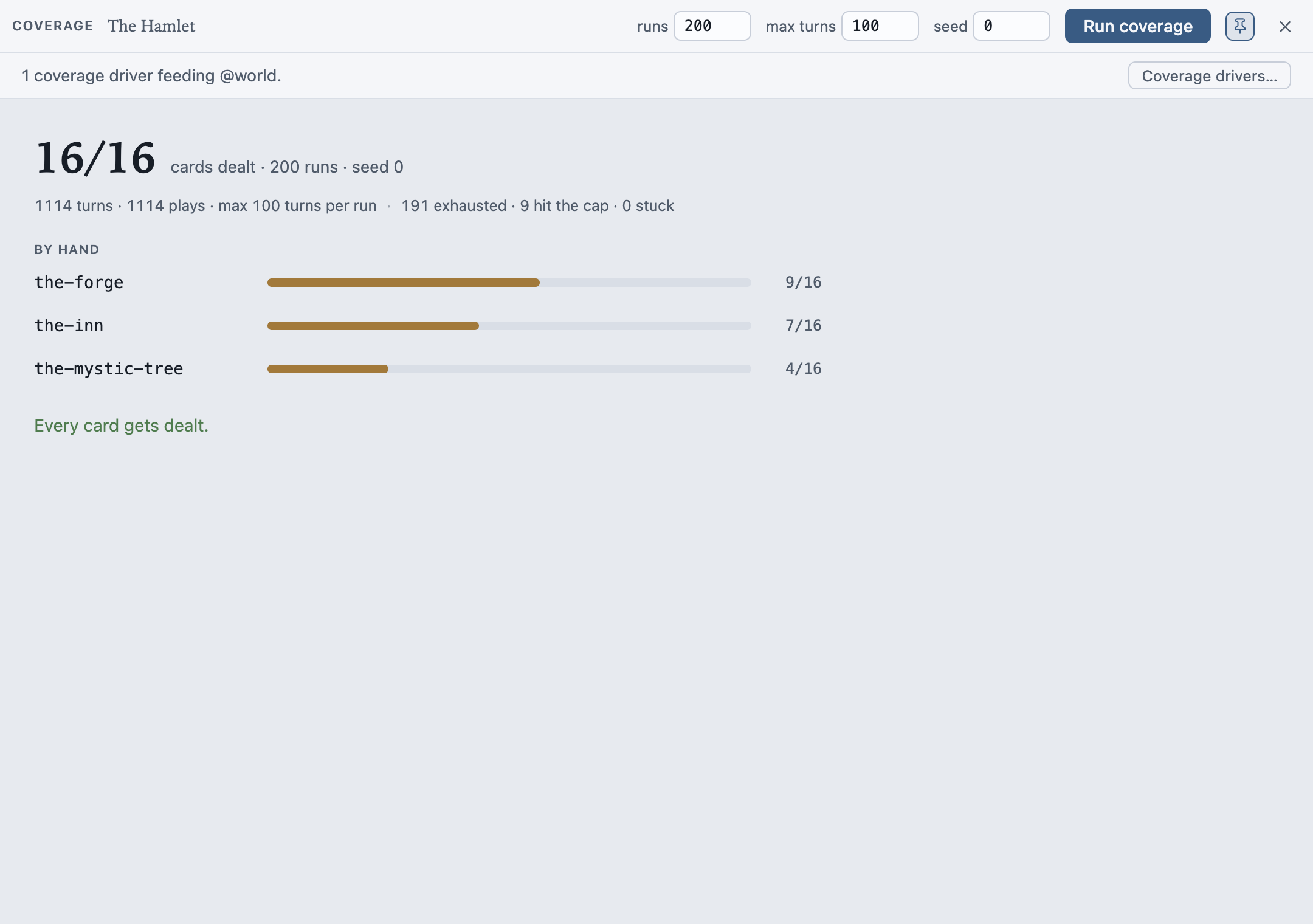
Three fields, runs, max turns and seed, and a Run coverage button. The same seed always reproduces the same run.
While a sweep is running, a strip across the top shows how far along it is, how long it has taken and roughly how long is left, with a Cancel button. The editor stays usable throughout, so you can keep working and stop it whenever you like.
Cancelling doesn’t throw the work away. It finishes the run it’s in the middle of, then reports what it measured, marked stopped early beside the headline. The run count is what it actually got through. A partial answer to “does my content get dealt?” is usually still the answer.
The previous results stay on screen, dimmed, while a new sweep runs, so you can read the last answer without mistaking it for the live one.
Coverage is a tool window like the Board and Find. It stays open while you edit and sits over the editor by default, which the Pin button releases. The last report stays put, so closing and reopening the window shows you what you last measured. Opening a different project clears it.
Under the bar, one line says whether you’ve told it how your game’s own state moves: either
“3 coverage drivers feeding @world” or “No coverage drivers: content gated on @world
will read as never dealt.” Beside it, Coverage drivers… takes you straight to where
they’re edited.
What it tells you
Section titled “What it tells you”The headline is one number: cards dealt out of cards total, with the run count and seed beneath it, then the shape of the runs themselves: turns, plays, and how the playthroughs ended, split between exhausted (everything was seen), hit the cap and stuck. Glance at that split before you trust the numbers above it: runs that mostly go stuck mean the content jams rather than that it was measured.
By hand is the lens that matters, because a hand is the contract between your designer and your programmer. One row per hand with a fill bar and a count: how many of the cards that hand could ever hold were actually held. A full hand highlights.
Never dealt lists every card no run reached, with a reason where one is knowable:
- “gated on
@world.time_of_day: nothing writes or drives it”, when the card depends on your game’s state and nothing in the content sets it; - “not reached in these runs” otherwise.
When every card gets dealt, the section is replaced by one line: “Every card gets dealt.”
Dealt but never played is the separate fault underneath it: these cards reach the board, and no outcome of theirs was ever taken. Usually an outcome’s condition is the culprit. A card that’s dealt a thousand times and never played is invisible if you only count deals. A card with no outcomes at all - a news headline, a codex entry, content whose whole job is to be dealt and read - is not listed here and doesn’t block a run from counting as exhausted: there is nothing to play, so “never played” would be an accusation it can’t answer.
Outcomes never played finishes the sweep at the branch level: a card can be well covered while one of its outcomes is unreachable.
Warnings collects two things the counts alone would hide. Any diagnostic the runtime
actually raised during the runs (a faulting condition, an undeclared name), deduplicated and
counted by run. And the composed-name check, which needs no runs at all: a card or deck gate
reading @hand.something that some hand able to ask it never composes - evaluation faults
there, so the content silently never deals from that hand, and a plain gap count would have
called it an ordinary miss.
Every row is a way back into the work. Click a hand, a card or an outcome and the editor opens it. Click a property named in one of those reasons and Find opens on it, listing everywhere in the project that reads or writes it. That’s usually the quickest way to tell a mistake from a missing driver.
On the canvases
Section titled “On the canvases”With View ▸ Coverage Overlay on, the node canvas and the map wear the last run: a card face carries a band reading never dealt or never played, a map site is haloed by how much play reached it, and hovering a card shows how often it was dealt and played. A card that’s fine shows nothing, so the overlay only ever points at a problem.
Content gated on your game’s state
Section titled “Content gated on your game’s state”@world belongs to your game. Coverage can’t invent your game’s behaviour, so content gated
on @world can’t be reached unless you tell coverage how that state moves. Rather than
reporting such a card as dead, coverage says why it couldn’t get there.
The fix is a driver, and when there’s a driver-shaped gap the window offers one button: Add coverage drivers. It works out a starting set of drivers from your conditions, writes them into the project, and re-runs. Content that was unreachable becomes reachable, and anything still never dealt after that is a real gap.
Writing drivers by hand
Section titled “Writing drivers by hand”The quick fix gets you a starting point; Project Settings ▸ World is where you tune it.
The @world declarations and the drivers that feed them sit on one page, because they’re two
halves of one statement: the game owns this value, and here’s how it moves.
Each driver is a property, a pool of values, and when it fires:
| Field | What it means |
|---|---|
| Property | The @world property to drive. Only @world is drivable: @story is written by your outcomes, so play already covers it. |
| Values | The pool, comma separated. true, false drives a flag; 0, 50, 51 drives a number; anything else is text. A run picks from the pool at random. |
| When | Once, at the start fixes the value for a whole playthrough (a difficulty setting, a chosen class). Each turn re-rolls it as the run goes (weather, time of day). |
| How often | For each turn drivers: rarely, sometimes or often. |
Propose from the cards reads your conditions and fills the list in: for @world.danger >= 2
it proposes the boundary and its neighbours, 1, 2, 3, so the comparison is exercised from
both sides. It replaces the list, so propose first and tune after. Nothing is written until
you save the dialog.
A driver with no property name, or with an empty pool, can’t drive anything and is dropped on save.
Drivers live in the project file’s coverage block, so the editor, the CLI and CI all read
one versioned spec. They never reach the compiled bundle.
From the command line
Section titled “From the command line”storyletengine coverage is the same run with the same defaults, which is what makes it a CI
gate:
$ storyletengine coverage the-hamlet.storyletscoverage: 200 run(s), seed 0, max 100 turns/run, 1313 turns, 1313 playsinputs driven: @world.time_of_daycards dealt 16/16, played 16/16; outcomes played 24/24hand the-forge: held 11/16 cards over 2154 deal(s)hand the-inn: held 12/16 cards over 2216 deal(s)hand the-mystic-tree: held 4/16 cards over 1313 deal(s)Never-dealt cards are listed with the same hints the window shows:
never dealt: market-rumours ? gated on @world.market_day - nothing writes or drives it (add a coverage driver?)never played: market-rumours/listen--fail-on-gap exits 1 on any never-dealt card, on any unprovided @hand read, and on any
runtime warning the runs raised. --json gives you the full report.
--propose prints the driver block instead of running, which is the same derivation the
editor’s quick fix uses. Every flag is on the CLI page.
Gating a build on it
Section titled “Gating a build on it”storyletengine coverage --runs 200 --fail-on-gapThat’s all CI needs. A never-dealt card fails the job, and because the run is seeded, a failure reproduces exactly on the machine you debug it on.
MIT-licensed open source · Made by Ian Thomas · storylet.studio