

The Board
Play ▸ The Board (Cmd+T), or the ▶ Play button in the top bar, opens the
Board: a separate window running the real runtime over your project, compiled in
memory.
This isn’t a preview. It’s the same engine your game ships with, so if a card is dealt here it’s dealt in your build.
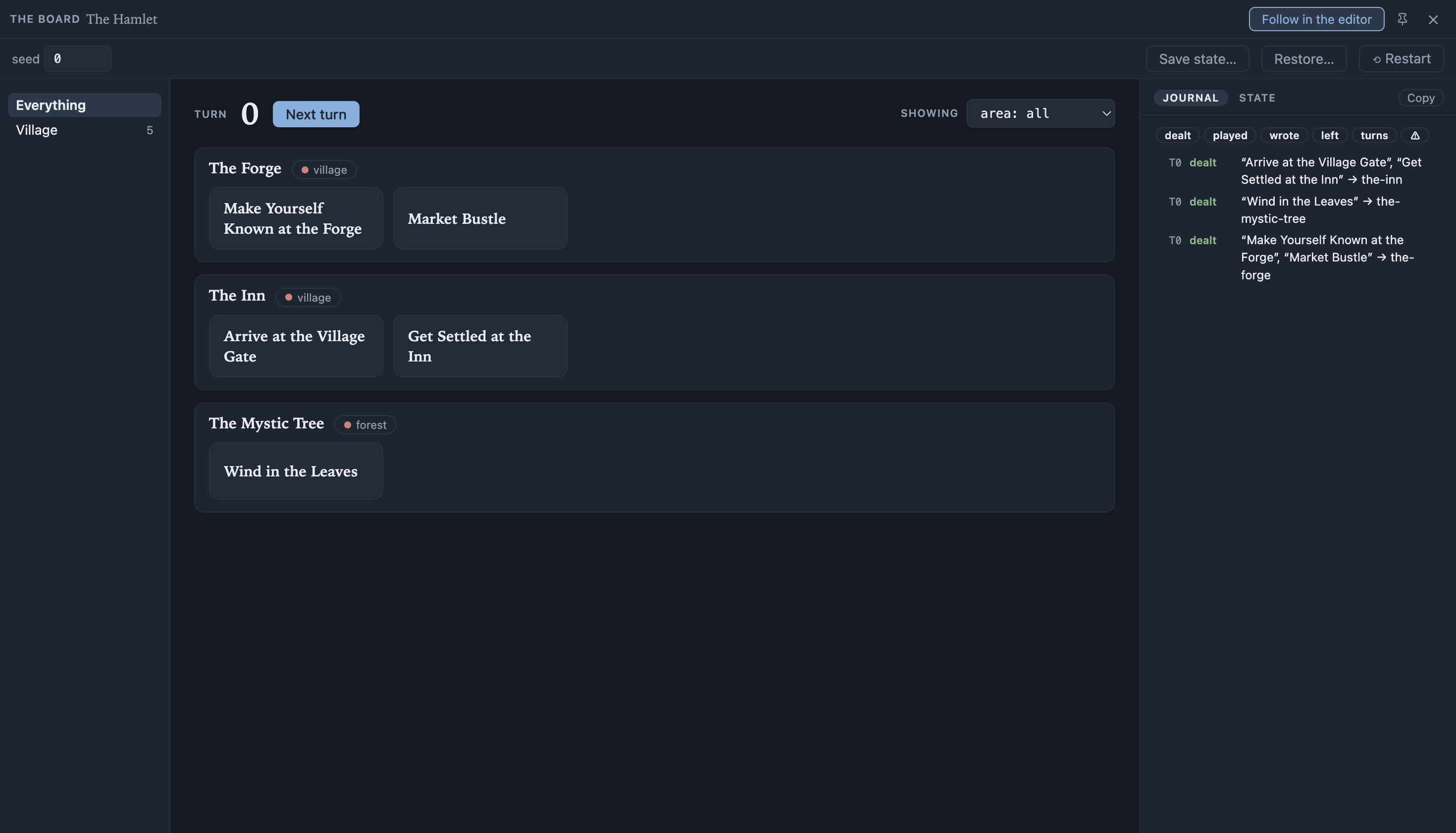
The Board puts you in the player’s seat. The diagnostics are all there, but they wait behind the rail’s State tab, so the default view is the game.
The main view
Section titled “The main view”- The hands. Every declared hand is a labelled group, tagged with its chosen tags as colour chips, holding its dealt cards as buttons. An empty hand says “nothing here right now”; a board with no hands at all tells you to add one in the editor.
- The filter bar. Under Showing, one picker per tag group (“area: all”, “area: forest”), so you can say “show me every hand in the forest” and the rest of the board gets out of the way.
- The clocks. Each box keeps its own clock, and in a multi-box project the header shows them all, each with a +1 to advance that one box alone; Next turn advances every clock together and the hands refresh. Plays advance only the played card’s box. A single-box project shows the one number that is then the whole truth. Clocks only run forward.
- The box navigator. Down the left, every box in the project - whatever the main area shows - with a count of the cards its hands hold and, after each action, a quiet badge counting what changed there. Visiting a box and moving on clears its badge. Everything at the top shows the whole board as one list; picking a box scopes the view to it, and the Board reopens on the box you were watching, remembered per project. This is how you notice a box you weren’t watching react: play a contract on one box’s map and another box’s badge lights.
- List and Map. A box with a map offers itself as a List of hands or as the Map, seen from above, and a project with a map opens on it. Your choice is remembered per project, so preferring the list in one project doesn’t decide another’s first impression. Pick a site on the map and its cards pop up over the bottom of the map, where you’re already looking.
- One place, drawn once. Boxes that share the same drawn space - the same group, the same zones, identical shapes - are one place, and Everything offers that map with every box’s hands pinned together. Play a contract loud and the news screens ring on the same picture, which is the whole cross-box story in one glance. A project like that opens there first.
Playing a card. Click a card and it opens: its title, its purpose, and its outcomes,
one full-width button per option. The open card floats over the bottom of the view -
list or map alike - so it stays in front of you wherever the board has scrolled. An
outcome whose condition isn’t met is still shown, disabled and labelled (locked),
with a tooltip saying why.
Playing takes two steps: pick an outcome, read what it’ll change, then press Continue (focused for you, so Enter commits) or Back to change your mind. The card then leaves its hand, the changes are written, its redraw cooldown starts and the clock advances. Escape unwinds the same way, innermost first: the choice, then the open card, then the window.
The journal
Section titled “The journal”The rail’s Journal tab: the story of the session so far, newest last. One line per event, and in a multi-box project each line is stamped with its box’s own clock, so two lines a stamp apart never read as time travel:
the-inn 0 dealt "Arrive at the Village Gate" -> the-innvillage 1 played "Arrive at the Village Gate" -> step-through wrote @story.act "arrival" -> "act-1"village 2 left "Market Bustle" (cooldown)T2 turn every box -> 2A play carries its own story: its writes sit indented beneath it, and under those the and so lines name its consequences - every card that dealt or left somewhere because of what the play wrote (its condition reads the changed state), plus a card that took the slot the played card freed. In a project with several boxes this is where the cross-box story shows itself: play a contract’s outcome and read the headlines it caused appearing on the screens, three sections away. The hands that changed also pulse briefly, the map marks their sites with a pulsing ring, and each box’s header carries a quiet “changed” count until the next action. A full every-box turn collapses to one line; advancing one box alone keeps its own.
Editing state from the State tab is on the record too: it journals as meddled, so the story never silently lies about who wrote what.
Filter chips at the top hide kinds of event: dealt, played, wrote (meddled rides
with it), left, turns, and a warning chip that carries a count when there is
anything to count. Copy takes exactly what you can see, filters included, so you can
paste a session into a bug report.
Snapshots, save and restore
Section titled “Snapshots, save and restore”Save state… gives the current moment a name and keeps it for this sitting;
Restore… lists what you’ve kept and puts one back. From the same panel, Export…
writes the current run to a .storyletsave file and Import… reads one back in (it
joins the snapshot list too).
That’s the same .storyletsave format a game writes, so a save from your game opens on
the Board and a Board snapshot loads in your game.
Seed, restart and staleness
Section titled “Seed, restart and staleness”The top bar carries the session seed as an editable field. Change it and the session rebuilds. A run is reproducible: the same seed always deals the same cards.
Restart discards the session and its journal and starts again.
The Board pins itself above the editor by default, and the pin is remembered. Turn on Follow in the editor and the editor opens each card as you play it, without taking focus from the Board.
When you edit the project underneath, the Board notices and shows a banner: “The project changed in the editor. Restart to play the new version.” It won’t swap the content under a run in progress.
Watching your game
Section titled “Watching your game”If you’ve turned on Live Link and a running game is connected, the Board can show its run instead of its own. A banner offers it: “A game is connected. Watch it?” Click Watch it, or use the Live / Local switch in the session strip.
In Live mode the Board is a mirror: the hands, the cards on them, the journal and “Not listed · why” all come from the game, live, and the clocks read the game’s own. It’s observe-only, so the game stays in control: seed, Deal, Next turn, playing a card, the State tab, Save state, Restore and Restart all step aside.
If the game is running several playthroughs at once, a picker appears beside the switch naming each one, and the Board follows whichever you choose. It shows one at a time on purpose: a Board mirroring four runs at once mirrors none of them legibly. Switching is instant, because the editor keeps each playthrough’s last table as it arrives rather than waiting for that participant to move. An ordinary single-player game never sees the picker.
The rest keeps working. The filter bar still narrows the board, the journal still copies, and Follow in the editor still opens each card the game deals or plays, without taking focus from the game. That’s the point of it for a designer: the game deals a card, and the card opens in your editor.
Switch back to Local, or disconnect the game, and your own session comes back exactly as you left it.
The State tab
Section titled “The State tab”Beside the Journal on the rail, in List and Map alike, the State tab holds the diagnostics.
- The raw state. Every declared property with its current value, editable in place. Changing a value simulates your game writing it: the hands re-deal straight away, the changed ones pulse, and the edit joins the journal as a meddled line - so you can ask “what would happen at night?” without writing a line of game code, and the record stays honest about the answer’s cause.
- Peek the stock. Choose a box, pick a tag per group, and press Peek. You see every card that could come up, in the order it would come up, each showing the numbers it was ranked on and labelled “looked at, put back”. Peeking doesn’t deal anything, so nothing here is playable: you never play a card from inside the deck. The listing is stamped with the clock it was taken at, and greys out the moment the session moves on.
- Not listed · why. For every card the deal looked at and rejected, the reason: cooldown, deck gate, tags, condition, priority, claimed, capped, and for shared piles “another playthrough is holding it” and “taken out of the world by another playthrough”. This is the trace the runtime emits for exactly this purpose, and it’s the answer to “why is this card not here?”. A card whose condition reads composed hand state that a box-wide peek doesn’t bind says “depends on the asking hand” - the peek asked without one, and that is the peek’s limitation, not a fault in your content.
MIT-licensed open source · Made by Ian Thomas · storylet.studio