

Setting up a box
A box is a self-contained set of decks, hands and tags: one region, one chapter, one cast. All of its setup lives on one page, so the navigator stays a tree of content.
The box page
Section titled “The box page”A box has six tabs, plus Maps when one of its tag groups is a place.
- Contents lists the box’s Decks and Hands, each with a count and a one-line description.
- Dealing is how the box puts cards in order. There’s one setting, Rank by specificity: whether a card that asks for more beats a card that asks for less. It’s on by default, and while it’s on, a card’s priority is the tie-break.
- Card template declares what every card in this box carries. A card’s fields are its
game data, and there’s no other mechanism for attaching any. Each field has a name, a
type (
boolean,number,string,enum,flags,quality; see Property types for which to use), a default and optional values. Change a field’s name or type and you reshape every card in the box, so in a team this is usually lead-owned. - Hand templates lists the kinds of hand the box declares, each row showing its bindings, its slot count and how many hands use it. Click one to open it.
- Tags lists the tag groups, each row showing its name and its tags as colour chips. Click one to open it. A group can declare properties every one of its tags carries.
- Properties declares the box’s own
@boxstate.
Hand templates
Section titled “Hand templates”A hand template is a kind of hand: “NPCs you can talk to”, “encounters at a place”. Its document has three tabs.
- Dealing holds the template’s bindings (tag groups pinned to one tag for every hand made from it), the groups each hand fills in for itself, and the shared When condition. That condition is written once and checked for each hand against that hand’s own tags, so one condition covers every place it governs.
- Bindings shows what’s pinned and what’s left for each hand to choose, with a count.
- Properties declares the
@handstate every hand made from this template carries.
Edit a template’s condition and every hand that uses it follows straight away. A hand can override only its slot count; everything else comes from the template.
Your game never names a hand template. Only hands can be dealt.
A hand is what your game deals: deal("tavern-encounters"). The box’s Hands page
lists them, each row showing which template it uses (or that it has its own rule) and its
slots.
A hand’s document has three tabs.
- Dealing starts with a Template picker: choose a template, or “(standalone: its own rule)”. Pick a template and you get one Chosen tags row per group the template leaves open, each a picker of that group’s declared tags. Choose its own rule instead and you get the bindings and the condition inline.
- Slots is how many cards the hand holds. A hand with its own rule switches between
unboundedand a bounded count. A hand made from a template has a single override field; leave it blank and the template’s value applies. - Properties is the hand’s own
@handstate. A hand made from a template inherits the template’s properties, and the tab tells you to edit them on the template so every hand follows.
You create each hand yourself; they aren’t generated from the tags. Not every npc value
is someone you can talk to, so you declare the ones that are.
Tag groups
Section titled “Tag groups”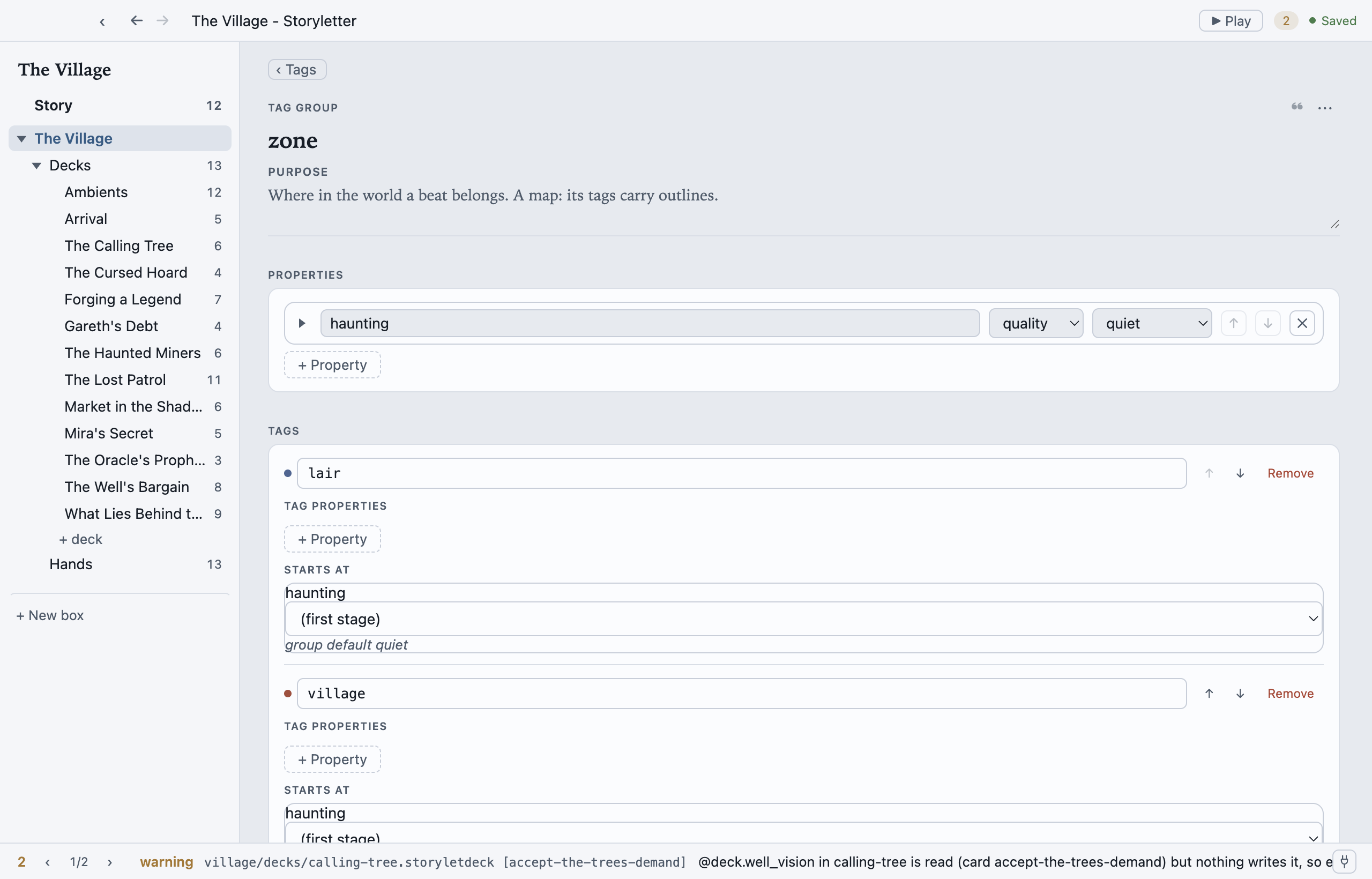
A tag group’s document is a single page: the group’s Properties at the top, then its tags. Tags are declared, not free-form, so a card can only carry a tag the box knows about.
Properties on the group are the ones every tag has. “Every zone has a haunting level” is one declaration here, and each tag below gets a Starts at row where you set only that zone’s own value. That’s usually what you want: declare once, and a zone you add next month arrives with the property already on it.
Whenever a hand is bound to a tag, that tag’s properties are part of @hand, so a card
reads @hand.haunting and never has to know which place it’s in. Writing it back is the
same: an outcome’s @hand.haunting lands on whichever place the hand belongs to, and
leaves every other place alone. A quality works here too, so each place can be at its own
stage of the same ladder.
Tag properties, on a single tag, are still there for a group whose tags genuinely differ. If you find yourself adding the same property to every tag by hand, that’s the group form asking to be used instead.
To draw a tag group as a map, turn on A place under Map. See Maps.
Starting a box from a box kit
Section titled “Starting a box from a box kit”+ New box opens the box kit picker. A box kit is a starting point you own, fully editable the moment it lands, with no reference to the kit left behind in your files.
There are two scales, and each says which it is: a box kit scaffolds one box, and a game kit scaffolds a whole project (Storyletter’s New Project picker offers those).
| Kit | What you get, and what it teaches |
|---|---|
| Blank | An empty box. Add your own decks, tags, hand templates and hands. |
| RPG encounters | The place-based starter: an area tag group drawn as a map, with the tavern and the market as zones you can redraw, an encounters-at template with one place already on the board, and an encounter whose outcome raises the box’s tension. Teaches boxes, tags, maps, and what playing a card does. |
| Dialogue topics | One hand of topics per NPC, including a shared rumour with a single copy, so whoever offers it first gets it. Teaches hands, copies, and how one card can be held by only one hand at a time. |
The two narrated kits carry a purpose note on every piece, including the outcomes, explaining what it’s for.
Each teaches something the other doesn’t, so working through both covers the model: RPG has the outcome that writes state, Dialogue has copies and exclusivity. Where a box kit has no use for a concept, it doesn’t declare it.
There was a Barks kit, and it has been withdrawn: barks belong in Patter, which is built for lines of performed dialogue, and a kit here would have encouraged writing them in the wrong tool.
storyletengine new box --kit <name> scaffolds the same box from the
command line.
MIT-licensed open source · Made by Ian Thomas · storylet.studio