
Multiplayer storyworlds
Most storyworlds are single-player: one playthrough, one set of state, one person (or one group huddled around one screen) moving through the story. That's the default, and if it's all you need you can ignore this whole page - nothing here changes how single-player works.
A multiplayer storyworld is different: many people play the same live storyworld at once, each through their own device, and some of the story's state is shared between them while the rest stays personal to each player. This is the model for a venue installation, a guided group experience, a city-wide street game, or any "we're all in this together" deployment.
This page explains what changes when you switch a storyworld to multiplayer, and the two extra kinds of property it unlocks. It's written to make sense whether you're building a solo game or a shared installation - the same authoring tool covers both.
NOTE: Running multiplayer storyworlds only applies to the StoryletEngine Server, not to Unreal/Unity/JS runtimes.
Single-player vs multiplayer: the one idea
In single-player, everything is shared because there's only one player - there's no distinction to make. Every property is just "the state of the game".
In multiplayer, you have to answer one extra question for each piece of state: is this shared by everyone, or personal to each player?
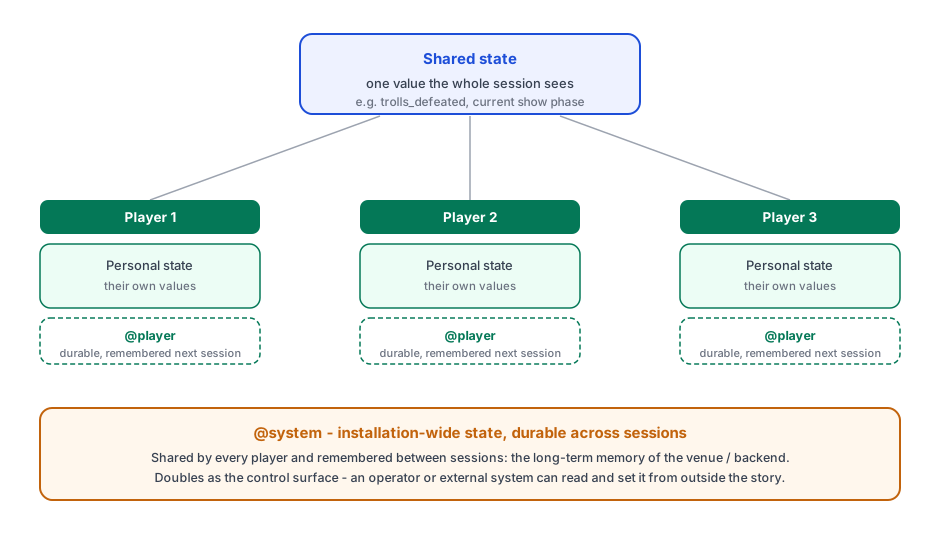
- Shared state has one value the whole session sees. If one player changes it, every other player sees the new value. Use it for the things that are true of the world everyone is in: a gate that's been opened, a boss that's been defeated, a tally everyone contributes to.
- Personal state has its own value for each player. One player changing it doesn't affect anyone else. Use it for things that belong to that person: their own score, their own inventory, the choices they personally made.
That one shared-vs-personal choice is the heart of multiplayer authoring. Everything below is about where you make it and the two new scopes that make "remembered across sessions" possible.
A "player" is one device, not necessarily one person. A solo player and a small group sharing one screen look identical to the storyworld - both are one player. There's no separate "party" concept to set up. If you want several people to each have their own personal state, each needs their own device.
Turning a storyworld multiplayer
The switch lives in Project Settings, as the storyworld's runtime model: Single-player (the default) or Multiplayer.
This is a big, rarely-reversed decision, so it's guarded:
- Single-player → multiplayer. Switching changes what every property's defaults mean (see "Shared or personal" below). The tool shows you each property with the shared-or-personal default it's about to take, and lets you confirm or override before committing. Existing single-player saved states can't be resumed as multiplayer - the shape of the saved state is different - so any live or saved single-player session starts fresh.
- Multiplayer → single-player. This is lossy: per-player and durable state collapse away. The tool makes you explicitly confirm you're discarding per-player progress.
Treat the switch like a one-time setup decision for the storyworld, not a toggle you flip back and forth.
While a storyworld is single-player, none of the multiplayer chrome appears - no shared/personal controls, no Player or System tabs. You author just as before.
Shared or personal: the layer choice
In a multiplayer storyworld, each property's editor gains a Multiplayer layer choice:
- Shared - one value, seen by every player.
- Personal - each player has their own value.
- Default - leave it on the scope's natural default (see the table).
Each scope has a sensible default, so you rarely have to think about it:
| Property scope | Default layer | Why |
|---|---|---|
| World | Shared | World state is usually "the state of the world everyone is in". |
| Deck / Act / Zone / Site | Personal | These usually track an individual's progress through some content. |
You can override any property's default either way. The control is hidden entirely in single-player storyworlds.
A practical example, in a co-op dungeon:
@world.boss_defeated(shared) - once anyone beats the boss, it's beaten for the whole party.@site.searchedon a treasure room, left personal - each player searches it for themselves.- Override
@site.lever_pulledto shared - a lever in the world stays pulled for everyone once one player pulls it.
The two new scopes: @player and @system
Multiplayer also unlocks two brand-new property scopes, each with its own tab on the Properties page. What makes them special is that they're durable - their values persist between sessions, not just within one playthrough. The six ordinary scopes (world, deck, act, zone, site, story) all reset to their defaults when a session starts; these two don't.
@player - durable, per-player memory
A Player Property is personal to each player and remembered across
sessions. When the same player comes back another day, their @player values are
still there.
- Define them on the Player Properties tab. Reference them in conditions and
outcomes as
@player.name- they autocomplete and validate in every condition editor like any other property. - They're always both personal and durable, so unlike the other scopes there's no shared/personal choice to make.
- Use them for a returning player's long-term identity: a loyalty level, "which endings this person has unlocked", "have they met the blacksmith before".
In a single-player game, "remember this person between visits" is rarely the point, so this scope is multiplayer-only. The tab is hidden in single-player.
@system - durable, installation-wide state
A System Property is shared by every player and durable across sessions. It's the long-term memory of the whole installation - the venue, the cloud backend, the street-game run - not of any one session or player.
- Define them on the System Properties tab. Reference them as
@system.name. - Examples: "trolls defeated since we opened", "total visitors this week", "which show phase the venue is currently in".
@system properties double as the installation's control surface. As well as
story outcomes changing them, an operator (a person running the venue) or an
external system (a show scheduler, a building control system, an IoT trigger)
can read and set them from outside the story. To keep a control knob out of the
hands of the story itself, each System Property has a write capability:
- Anyone (the default) - story outcomes can change it too. This is the right choice for the common case: a counter that outcomes bump.
- Operator & external only - story outcomes can't change it; only the operator or an external system can. Use this for a true control knob, like "the venue is now in its evening phase", that the story should react to but never set itself.
Like @player, this scope only makes sense where there's a persistent
installation, so it's multiplayer-only and the tab is hidden in single-player.
Designing with external state
Because @system (and, in single-player, host-set @world) can be driven from
outside the story, you can write content that only becomes reachable once an
operator or external system sets a value. So this content doesn't look like
a dead branch when you're testing, declare those possible external values as
external inputs - see External inputs. Both Coverage and
Simulate then exercise that content for you.
Testing a multiplayer storyworld
You don't need a live deployment to test multiplayer. Both testing tools run it right inside the authoring tool:
- Simulate starts a shared session with a roster of players.
Pick the active player to see the map, hands, properties, and log from
their point of view, watch a shared write by one player appear for the
others, act as the operator to set a
@systemvalue, and step turns per-player or all at once. The activity log has an All players toggle that merges every player's entries into one turn-ordered stream tagged by player - the quickest way to see how one player's action set up another's. - Coverage Testing gains a Players knob and
simulates that many players sharing one session, so content that only unlocks
once another player has changed shared,
@player, or@systemstate gets reached and counted instead of looking like dead content.
When it goes live
Running a multiplayer storyworld as a real shared installation (players joining
over a network, durable per-player and installation state stored centrally, the
operator control surface exposed to real external systems) is the
StoryletEngine Server's job. The authoring, testing, and content concepts on
this page are exactly the same; the Server is what hosts the live shared session
for real players. For the operator side of a live installation - returning
players, the @system control surface, watching a shared session, and stepping
in to unstick a player - see Publishing to the StoryletEngine Server
and Monitoring the StoryletEngine Server.