
For Game Developers
Here to drop a storyworld into a game? This is your starting point: how the workflow looks from the integration side, which plugin to reach for, and where the source and licence live.
Storylet Studio comes in two halves:
- Authoring is the desktop app (or the web app), where a writer or designer builds a storyworld - the acts, decks, storylets, sites, and state - and plays it through as they go. None of it touches your game.
- Runtime is your game. The author publishes a
.storyworldbundle, and you load it with the StoryletEngine plugin for your engine. The plugin works out which storylets are eligible right now, applies the outcome the player picks, and keeps the world state. Your game owns the presentation; the engine owns the flow.
The workflow
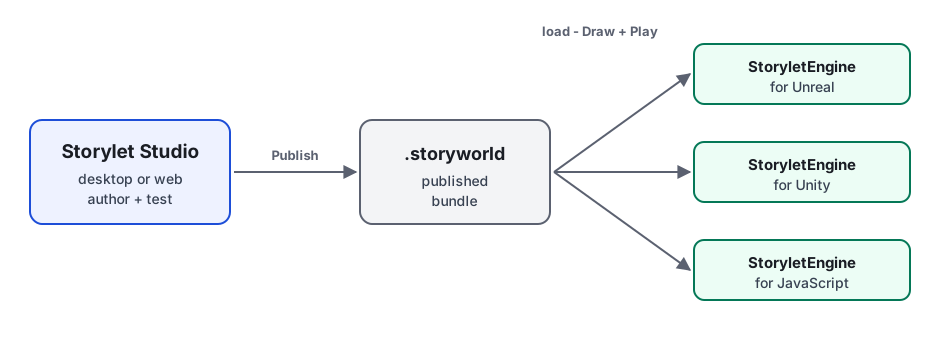
- The author builds and tests the storyworld in Storylet Studio.
- They hit Publish to produce a
.storyworldbundle - one JSON file with every storylet, site, zone, act, property declaration, and game-data field, expressions already compiled. - You drop that bundle into your project and load it through the StoryletEngine plugin.
- Each turn, your game calls Draw for the eligible storylets and Play to apply a chosen outcome. That Draw / Play loop is the same in every plugin. Outcomes can be gated by a condition: each drawn outcome reports whether it is currently available, so your UI can disable the choices a player has not yet unlocked, and Play rejects an outcome whose condition is not met.
The bundle is the contract between the two halves. The author can re-publish an updated storyworld and you won't change a line of integration code - as long as the property keys your game reads and writes stay put.
Choose your engine
All four plugins load the same .storyworld and expose the same runtime model
(sessions, sites, hands, Draw / Play, save / restore, a dev-time inspector). Pick
whichever matches what you ship in.
| StoryletEngine for Unreal | StoryletEngine for Unity | StoryletEngine for Godot | StoryletEngine for JavaScript | |
|---|---|---|---|---|
| Engine | Unreal Engine 5.7+ | Unity 6 LTS (6000.0+) |
Godot 4.4+ | Any modern JS runtime |
| Language | Blueprint or C++ | C# | GDScript | JS / TypeScript |
| Install | Plugin zip into Plugins/ |
UPM package into Packages/ |
Addon into addons/ |
file: dependency or <script> |
| Bundle import | Drag .storyworld into the Content Browser |
Drag .storyworld into the Project window |
Drop .storyworld into the FileSystem dock |
Fetch / import the JSON |
| Runtimes | UE games / editor | Unity games / editor | Godot games / editor | Browser, Node >=20, Bun, Deno, Workers, Electron, Tauri |
| License | MIT | MIT | MIT | MIT |
| Guide | StoryletEngine for Unreal | StoryletEngine for Unity | StoryletEngine for Godot | StoryletEngine for JavaScript |
Grab the plugins from download.storylet.studio. Each one ships with its own full install and API docs; the guides above are just the orientation.
What carries across engines
- One bundle, same behaviour. A
.storyworldplays the same way in every plugin - the engine semantics are shared, and conformance tested across all four ports. - Portable saved state. All four read and write the same
.storyworldstatefile, so a session saved in one restores in another (and in the authoring tool's Simulate view). - A shared sample. Every plugin ships the same Riverbend Inn storyworld, so you can hold the same content up against each integration.
- A dev-time inspector. Each plugin has an in-editor (or in-DOM) inspector for poking at a live session: state, properties, and the action log.
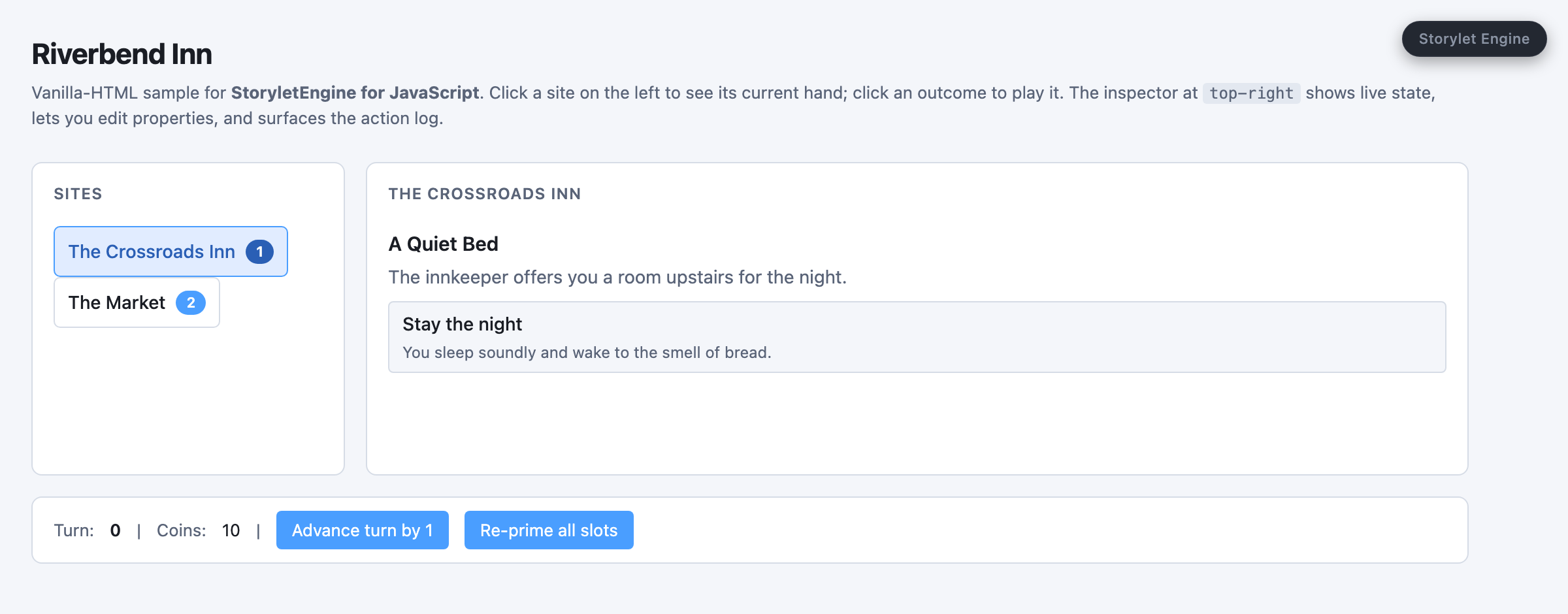
The Riverbend Inn sample on the JavaScript engine: pick a site, see what's dealt there, play an outcome. The Unreal, Unity, and Godot plugins ship the same storyworld, so you can hold the same loop up against each.
Storylet Studio is not only for games
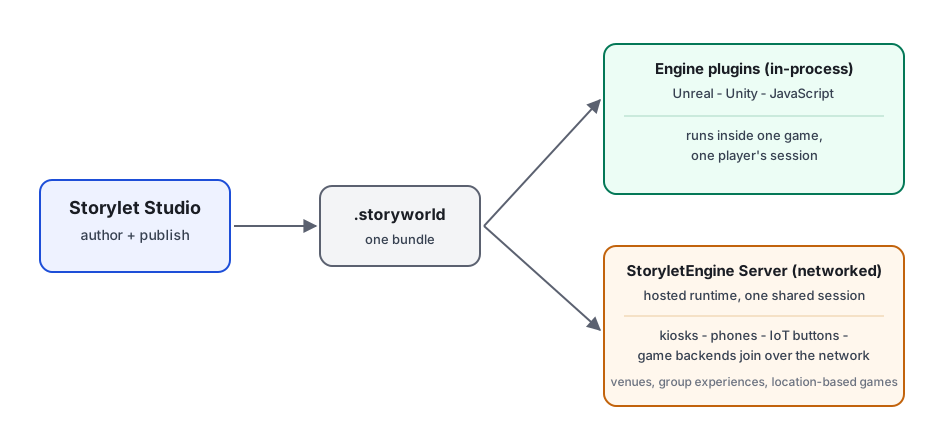
Engine plugins are the common case, but the same published storyworld can run as a network service instead of inside one game. The StoryletEngine Server hosts a storyworld so many devices - kiosks, IoT buttons, phones behind a QR code, a cloud-game backend - join one shared session and play it together. That's the model for venue installations, guided group experiences, and location-based games. If that fits your project, start at Publishing to the StoryletEngine Server and the StoryletEngine Client for JavaScript.
Source and licensing
The desktop app is free to use, but it isn't open source - it's the property of Ian Thomas. The engine plugins are open source under the MIT licence, with their source mirrored publicly on GitHub. See Licensing and Source for the full terms and the repository URLs.
Where to next
- Getting Started - if you also want to author, or just try a sample storyworld first.
- Core Concepts - the vocabulary of storyworlds (acts, decks, storylets, sites, state).
- Game Data - how authors attach custom fields your game reads at runtime.
- Your engine's plugin guide: Unreal / Unity / JavaScript.